 Kitewell
AI-native RPA · Version 0.20.2
AI learns the job once.Then it runs fast, without second‑guessing.
Describe the job, and AI does it once in a browser or app you can watch, and remembers what worked. From then on, Kitewell repeats it. It doesn't ask the model for every click, so runs stay fast and costs don't grow with every run. When a screen changes, AI relearns it, and it stops for your OK where it matters.
Public beta for macOS 13+ and Windows 10+. Free for up to 10 workflows, with AI included when you sign in for free. Kitewell Cloud, which runs with your computer closed, is coming soon.
Read the film's narration
The clicking, typing, and copying you still do by hand. A person's pointer races through one Monday's chores: signing in to a supplier's portal, downloading invoices, copying a total from a PDF, pasting it into an old desktop accounting app, and sending a summary. The camera pulls back to their computer, where three labels name where that work lives: behind a sign-in, in an app with no API, and in an Excel file.
RPA promised to take it off you. But every robot was built by hand, and fixed by hand whenever a screen changed. A recorded script replays the same chores with a robot's pointer. On a held chord it stops, and a specialist writes each step by hand. The supplier redesigns its sign-in page; the robot clicks where the button used to be, the step fails with "Element not found", and the specialist comes back to fix it.
Now, AI builds it. The three places, checked off, above the headline: AI builds the automation. Your computer runs it.
Describe the job, and Kitewell lays out every step for you to check. In Kitewell's chat window, the request is typed: “Every weekday at 9, collect new invoices from the Harbor Supply portal, enter them in Ledger, and email me a summary.” Kitewell proposes the workflow as a card with its steps drawn as a graph; applied, the workflow draws itself in the editor.
Or build it from Claude Code or Codex, over MCP. For developers: the workflow's YAML, then a terminal where a coding agent changes it through Kitewell's MCP tools, checking the draft and then saving it.
On the first run, AI learns the job in your browser. Then your computer runs it, every day. Real Kitewell runs against a stand-in supplier portal on the same computer. The first run's record, each action worked out as it goes, beside what the browser saw; then the next run, its sign-in actions marked Replayed.
When a site changes, AI finds the new way, and keeps it. The portal moves its sign-in button. In the next run's record, "Click Sign in" is marked Recovered: AI found the new button. In the run after that, the same action is Replayed.
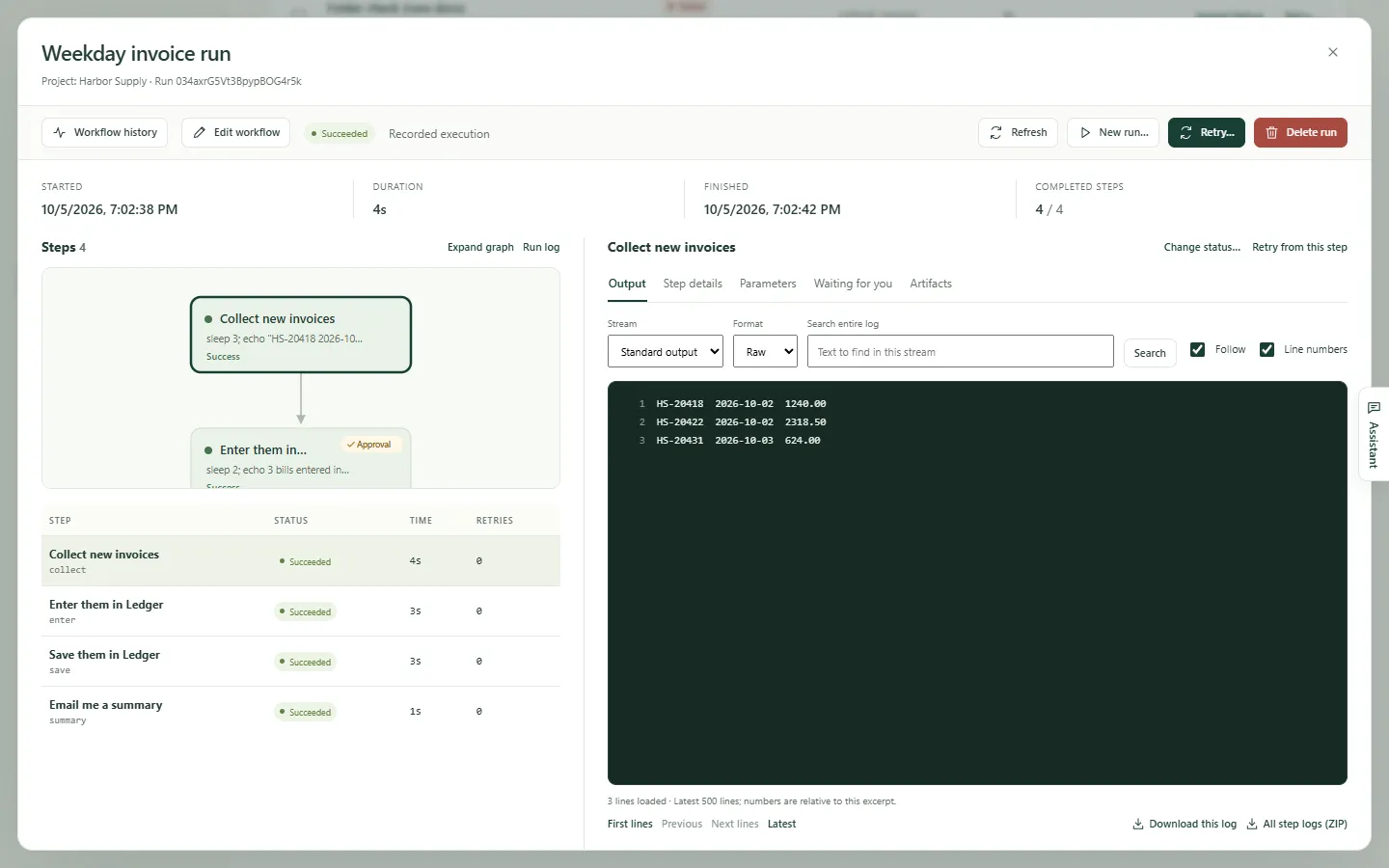
It stops for your OK where it matters. A notification says a step is waiting for the person. One click approves it, and the run's record shows every step done and who approved it.
Got a list in Excel? It runs every row and writes the results back. A sheet linked to orders.xlsx runs the workflow once per row; then the workbook itself fills in each row's result.
Coding agents too. Claude Code writes the fix, Codex reviews it, and nothing ships until you approve. A real workflow on a demo repository: Claude Code fixes a failing test, with Codex and then Gemini behind it if it fails; Codex reviews the change; the run waits at the approval with Approve and Send back before the fix is committed on a local branch.
It runs on your computer, and your passwords stay there. On another computer that took the project, its portal password named but not filled, the person there sets the value, and the page notes that values stay on each device.
Run it on every computer, and watch them all from the cloud. If a run fails, or a computer goes quiet, you hear about it. The two computers report their runs to Dagu Console, whose real computers page takes the frame. Kitewell's alert for a failed run arrives in the team chat, and Dagu Console's email says a computer stopped reporting. Notes say Kitewell's alerts need Personal or Team, and Dagu Console's stopped-reporting alerts are turned on per computer.
Kitewell. It flies on its own. You hold the string. The kite leaves the logo and flies, its string running back to the last word. kitewell.app. Free for one project, on macOS and Windows.
How it works
AI builds it
Describe the job in plain words. The assistant lays out every step for you to check, works the site in a browser you can watch, and tries the draft without sending anything out. Nothing runs until you apply it.
Your computer runs it
On a schedule, from a webhook, or from your phone. It stops for your OK wherever you put a gate.
AI maintains it
When a site or app changes, AI finds the new way, keeps it, and the run shows what it fixed. When a run fails, AI tells you why.
Browser automation
Built by AI. Maintained by AI.
Tell Kitewell the job in plain words. AI signs in, clicks, types, and collects in a browser you can watch and take over, and writes the steps from what worked. Later runs repeat them, and when the site changes, AI finds the new way and keeps it.
- Behind any sign-inSign-ins stay in Kitewell's own browser profile on the computer. Sites that ask for a client certificate work too.
- Passwords stay out of the modelA password is named in the step and typed from the computer's secrets; the model sees only the name.
- It shows what it fixedEach run marks the steps it repeated and the ones AI fixed, with screenshots.
- Start page
- 127.0.0.1:4320/billing/invoices
- Browser steps
- 5
- Ran without AI
- 3 of 6 operations
What the browser did
- Open page127.0.0.1:4320/billing/invoicesCompleted
- DoType [email protected] into the email fieldReplayed
- DoType %password% into the password fieldReplayed
- DoClick Sign inRecovered
- Make suretext "Invoices"Completed
- CollectEvery invoice issued since the last weekdayCompleted
AI-native RPA
RPA was the right idea. Building it by hand was the problem.
| Hand-built RPA | Kitewell |
|---|---|
| A specialist records and scripts every click | AI builds it from your words |
| A changed screen means someone repairs the robot | AI finds the new way and keeps it |
| A robot PC and a license per robot | The computer you have, free for up to 10 workflows |
| One tool per kind of system | Websites, desktop apps, Excel, and email in one workflow |
| Hard to see what a robot did | Every step, screenshot, and approval in the run record |
Beyond the browser
Desktop apps, Excel, and email, too.
Desktop apps with no API
A model reads the screen and works the app, with your own AI key or the included AI on a paid plan. Later runs replay on Windows by the app's own buttons and fields, and on macOS from the screen.
Excel, row by row
Runs once per row of the workbook you already have and writes each result back beside it. Title rows, merged headers, and subtotals included.
Find, read, file, and send mail in Microsoft 365, Gmail with an app password, or any IMAP mailbox.
Scripts, servers, and APIs
Commands, Docker, SSH rollouts a few machines at a time, and any OpenAPI, with decision steps that choose the next path.
Coding agents
Claude Code, Codex, and 13 more, on your schedule.
Put the coding agents you already use to work while you're away, on the sign-in you already have. Kitewell starts the agent you installed; each vendor's terms apply.
- Chain themOne writes, another reviews. Run them side by side, or once per repository from a sheet.
- Keep going at the limitWhen an agent hits its usage limit or fails, the next one you listed takes over.
- Nothing ships uncheckedA gate holds the push until you approve. Send back re-runs the agent with your notes.
- Started by GitHubAn issue or pull request can start the run through a webhook, with no open ports.
- Claude Code
- Codex
- Cursor
- Gemini
- GitHub Copilot
- Aider
- Amp
- Cline
- DeepSeek
- Droid
- Goose
- Kiro
- OpenCode
- Pi
- Qwen
- Any other CLI, as a custom command
- Agent · Claude CodeDraft a fix on a branchIf it fails: Codex, then Gemini
- Agent · CodexReview the change and list what to correct
- ApprovalWait for you before pushing
- CommandPush the branch and open a pull request
Triggers
It starts on its own.
Schedules
Daily, on weekdays, or any schedule, in your time zone. Starts a sleeping computer missed are caught up when it wakes.
Webhooks
GitHub, Stripe, Slack, or any service starts a workflow on your computer through Kitewell's relay. Signatures are checked, no port is opened, and a request waits up to 7 days.
Personal and TeamFrom anywhere
From ChatGPT or Claude on your phone, from Claude Code or Codex over MCP, or with a REST call.
Control
Approve and follow runs from your phone. Know why one failed.
Approve or send back
Any step can wait for your OK. Approve it, or send it back with a note, from the run, a notification, or ChatGPT and Claude on your phone.
Runs in your browser
Dagu Console shows each run of a synced project and the computer it ran on. Open it on your phone. Free with a Dagu Cloud account.
Alerts
Slack, Microsoft Teams, PagerDuty, email, or a desktop notification when a run fails, waits for you, or misses its schedule. With Personal and Team.
When a computer goes quiet
Dagu Console emails you when a computer stops reporting for 10 minutes: asleep, offline, or Kitewell quit. Turn it on for computers meant to stay on.
Failure diagnosis
AI reads a failed run and says whether to try again, step in, or change the workflow.
Run record
Every step's output, screenshots, and decisions. Retry from the step that failed.
Test first
Run one step with real inputs before you save, and try a draft without sending anything out.
Notes that stay
The assistant keeps what it learns in knowledge pages, for you and whoever takes over.
ChatGPT Plus and Pro can read runs but not approve them.
Teams and fleets
Run it on every computer. Watch them all from one place.
- Every computer, one viewDagu Console lists each computer's status, Kitewell version, and today's runs. One alert per workflow, however many computers run it, closed by the next success on any of them.
- Sync and rolesShare projects with Viewer, Editor, and Admin roles. Each computer keeps its own sign-ins and secret values.
- ReleasesPromote workflows from Dev to Staging to Prod, with a diff and rollback.
- Robot ledgerExport a ledger of every workflow for audits, one row each.
- Shared computers (Enterprise)Computers your organization owns, such as a VM in your own Azure or AWS, run workflows day and night with nobody signed in. Nothing stops when a laptop sleeps or its owner moves on.
- Build from a browser (Enterprise)Sign in with your company account, then build and try workflows on the computer they run on while you watch its browser. Approve fixes from your phone, with no remote desktop.
Kitewell Team, for organizations of up to 25 people, is quoted per computer.
| Computer | Status | Kitewell version | OS/arch | In progress | Failed today (UTC) |
|---|---|---|---|---|---|
| Front desk PC | Reporting | 0.17.3 | windows/amd64 | 1 | 0 |
| Accounting PC | Reporting | 0.17.3 | windows/amd64 | 0 | 1 |
| Build Mac | Reporting | 0.17.3 | darwin/arm64 | 2 | 0 |
| Warehouse laptop | Not reporting | 0.17.3 | windows/amd64 | 0 | 0 |
Where it runs
On your computer, or in the cloud.
- Your computer
- On Mac and Windows, with your own sign-ins. Watch it work, and approve a step from your phone.
- Kitewell CloudComing soon
- Runs on schedule with your computer closed. Build and fix workflows from a browser or your phone. Each project gets its own machine, up only while it works.
- Your company's cloudFor companies
- A VM in your Azure, AWS, or Google Cloud, or a server in a closed network, running with nobody signed in, with your company's own AI.
On your computer
Your computer, your keys, your files.
- Secret values
- Encrypted on the computer. Never synced, exported, or backed up.
- Your choice of AI
- Anthropic, OpenAI, Gemini, OpenRouter, Kitewell's included model, or a local model that keeps everything inside your network.
- No lock-in
- Workflows are plain YAML on the open-source Dagu engine. Export a project any time.
- Quiet in the background
- Runs from the menu bar or tray, with nightly backups, edit history, and engine updates that roll back if they fail.
- What leaves, exactly
- A synced project sends run status and the names of failed steps, never logs, output, or secret values.
- Six languages
- The app speaks English, Japanese, Chinese, Korean, French, and German.
Examples
What do you still do by hand?
- Every weekday morningEvery morning I log in to our supplier's portal, download the new invoices, and type each one into an accounting app from 2009.
- Whenever new orders come inI go down an order list in Excel, place each order on a supplier's website, and type the receipt number back into the sheet.
- Every few daysEvery few days I open each emailed invoice, copy the supplier and the total into a spreadsheet, and file the email away.
- Every morningEvery morning I read through fifty emails to find the five that actually need me.
- Every weekday at 2:00Some mornings the tests on main are red, and my first hour goes to finding out why and fixing it.
- Every new pull requestEvery pull request waits for my first pass, and most of what I flag, a careful second reader would have caught.
- Every new issueEvery new issue arrives without a label, and half the bug reports don't say how to reproduce the problem.
- Every MondayEvery Monday I update our dependencies, run the tests, and lose the morning fixing whatever broke.
Pricing
Free for up to 10 workflows.
One project with up to 10 workflows is free, and a free sign-in adds 100 AI credits with no API key. Personal adds room, alerts, and webhooks for $20 a month; Team adds people, quoted per computer for organizations (USD, excluding tax).
Public beta for macOS 13+ and Windows 10+. Free for up to 10 workflows, with AI included when you sign in for free. Kitewell Cloud, which runs with your computer closed, is coming soon.